Power Panel – Quick Access to Essential Power Actions
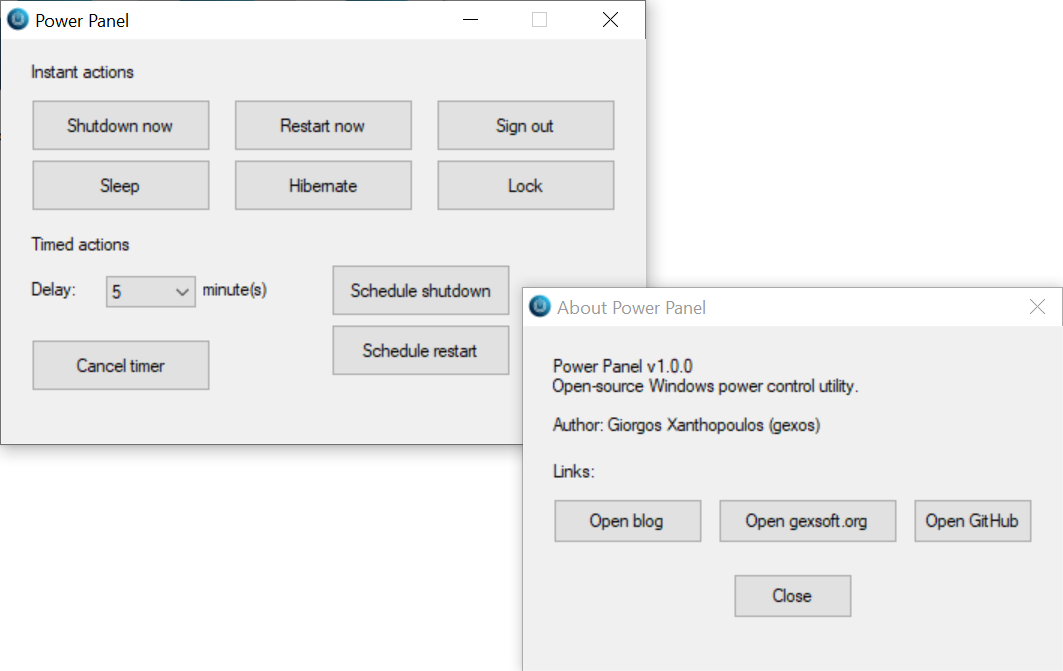
Power Panel is a small Windows utility I created to make everyday power actions faster and more convenient.
Instead of clicking through multiple menus, you get a clean panel with the options you use the most.
What Power Panel offers
With a single click, you can:
- Shut down your PC
- Restart
- Put the system to sleep
- Hibernate
- Lock the session
- Log off
The goal is simple: reliable power controls, always in the same place, without any unnecessary extras.
Portable and lightweight
Power Panel is:
- A single executable file (no installation required)
- Portable – ideal for USB toolkits and technician use
- Minimal – no ads, no background services, no configuration needed
Download it, place it where you prefer, and run it when you need it.
Security note
Power Panel is written in AutoIt and compiled into an EXE.
Because it’s a custom tool and not a widely known product, some antivirus solutions may flag it as “unknown” or “suspicious” purely based on reputation.
If you want to verify it, you can:
- Scan it with your antivirus
- Upload it to VirusTotal
- Run it in a test environment first
Download
You can find the latest version of Power Panel on my GitHub releases page: